

An emoji with feet can refer to a smiling character with little feet or to a standard foot-related symbol. The smiling character is usually a custom sticker, GIF, or image. For copyable Unicode emoji, use 🦶 for a foot or 👣 for footprints.
Which Emoji With Feet Are You Looking For?
Start with what you want to show. A body-part symbol, a pair of footprints, and a blushing smiley with feet are different things, even when search results group them together.
| What you want | Use | What it represents |
|---|---|---|
| One human foot | 🦶 | The standard foot emoji |
| Two separate foot symbols | 🦶🦶 | Two copies of the foot emoji |
| Marks left by walking | 👣 | The standard footprints emoji |
| A leg | 🦵 | A different body-part emoji |
| A smiling face with little feet | A custom image, sticker, or GIF | A drawn reaction character |
If you saw a round yellow face with feet sticking out, search for the drawing in your app’s sticker or GIF tools. Looking only in the standard emoji keyboard may not find it.
An emoji with feet up may also be an animated character kicking its legs. A still picture can suggest the same pose, but it will not move unless the asset contains animation.

Original illustration of a custom reaction character, not an official Unicode emoji or an app screenshot.
What Does the Smiling Emoji With Feet Mean?
The expression and pose provide clues. A smiling face with rosy cheeks and little raised feet can suggest delighted excitement, shyness, or playful affection. Those are possible readings of the artwork, rather than a fixed definition for every version.
A character laughing with its feet in the air may feel different from one looking nervous or hiding its face. Read the actual image alongside the message that prompted it.
Giddy or Shy Excitement
A giggling emoji with feet can fit the feeling of being so pleased that sitting still seems impossible. Someone might use it after good news, a thoughtful surprise, or an especially cute message.
Here is an illustrative conversation:
Jordan: “I found tickets for your favorite band.”
Maya: “You did? I’m kicking my feet right now!”
A feet-up character would reinforce Maya’s delight. The tickets explain the reaction; the image would add the playful expression.
The sender does not need to be physically kicking their feet. A cartoon reaction can exaggerate an emotion in the same way that a written “I’m screaming!” can describe excitement.
A Friendly Reaction or a Flirty One?
A blushing emoji with feet can support flirting when the conversation already expresses attraction. It can also communicate friendly excitement or appreciation.
Compare the concert example with this illustrative exchange:
Jordan: “Dinner Saturday? I’d like to take you on a date.”
Maya: “I’d like that 🥰”
A shy feet-up sticker could fit the second exchange because the words establish a romantic setting. The same sticker after a friend’s thoughtful favor would not establish romantic interest by itself.
For another warm text reaction, see the smiling face with hearts meaning. The surrounding words help distinguish appreciation from attraction.
Joking or Exaggerated Reactions
The character can also be part of an over-the-top joke. Someone may react to a tiny convenience as though it were wonderful news, using a delighted drawing for comic effect.
A caption such as “They gave me an extra cookie” followed by an exuberant feet-up character could simply express playful gratitude. Look at the situation before treating the pose as a coded message.
Emoji With Feet Copy and Paste
If you need characters that belong inside a text message, use the symbols below. These are different from downloading a picture of a smiley with feet.
Foot, Footprints, and Leg
Foot: 🦶
Footprints: 👣
Leg: 🦵
The foot emoji represents a human foot. It can fit a literal message about feet, shoes, walking, or resting after being on your feet.
For example:
“Those new boots need breaking in. Giving my feet a rest 🦶”
The footprints emoji represents marks left by feet. It can suit a caption about a walk or a trail:
“Morning walk along the shore 👣”
The words establish the scene. Neither symbol automatically communicates the shy, blushing expression of a custom character.

Illustrative font rendering; actual artwork varies by app and device.
Foot Emoji Skin Tones
The standard foot emoji supports five skin-tone modifiers in addition to its default form. Copy the complete version you want:
| Version | Copy |
|---|---|
| Default | 🦶 |
| Light skin tone | 🦶🏻 |
| Medium-light skin tone | 🦶🏼 |
| Medium skin tone | 🦶🏽 |
| Medium-dark skin tone | 🦶🏾 |
| Dark skin tone | 🦶🏿 |
These forms are listed in Unicode’s emoji test data. When selecting a toned version, include the foot and its modifier together.
Changing the tone affects the standard foot symbol. It does not add feet to a smiley face or change the design of an unrelated sticker.
Face-and-Feet Combinations
You can place existing characters together, such as 🤭🦶🦶 or 🥰🦶🦶, as your own playful shorthand. Their intended tone needs context; they do not have one universal interpretation.
For clarity, add words such as:
“That message has me giggling 🤭🦶🦶”
Putting a face beside a foot does not fuse them into one new emoji. The recipient will ordinarily see separate characters. Use an image or sticker when you want a single drawn character with attached feet.
How to Get an Emoji With Feet on Your Device
First decide whether you want a text symbol or a particular drawing. Copying 🦶 is a text operation. Using the smiling character requires your app’s image, sticker, or GIF features.
For the character illustrated in this guide, save the original image below and use a supported image-sharing or sticker-creation option.
Original static character image with a transparent background. Importing it as a sticker depends on the app.
On iPhone
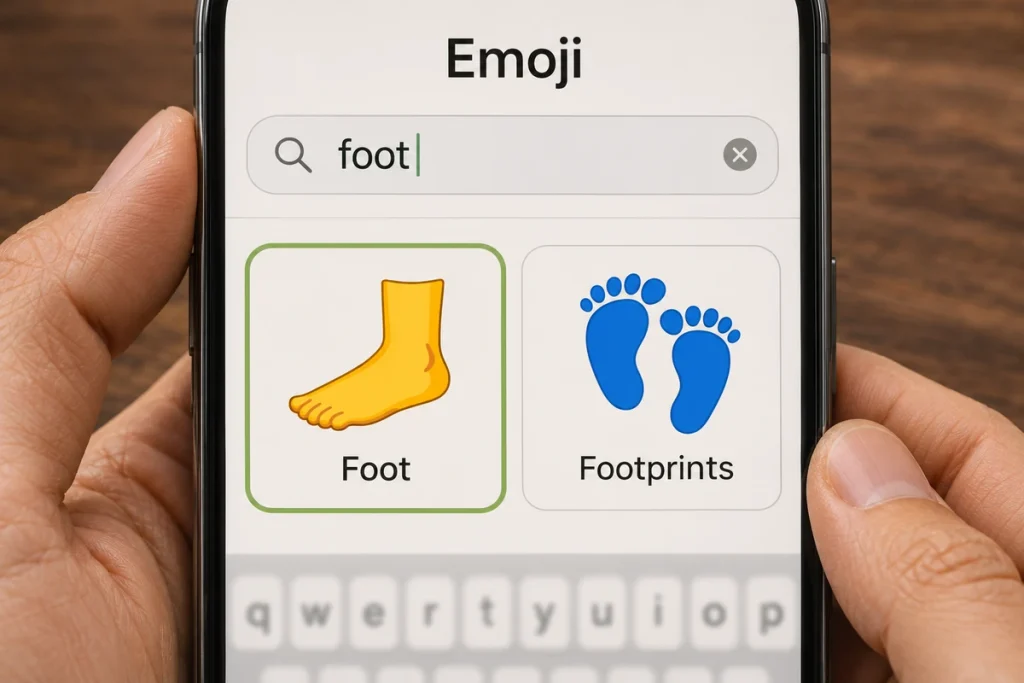
For the standard symbol, copy 🦶 from this page and paste it into your message. You can also look for “foot” in the emoji keyboard.
On a compatible iPhone with Apple Intelligence and Genmoji available, you can create a custom character from a description:
- Tap a text field and switch to the emoji keyboard.
- Open Genmoji.
- Enter a description, such as “a smiling yellow face with two little feet and rosy cheeks.”
- Generate and review the result, refine it if needed, then finish with Done.
Apple’s Genmoji guide explains the feature and its availability requirements. Controls can differ between software versions, and Genmoji is not available on every iPhone or in every language and region.
A generated result is a custom creation. It does not add a new universal Unicode character to everyone’s keyboard.
On Android
For 🦶 or 👣, paste the character into an editable field or select it from your keyboard’s emoji section.
For a custom reaction using Gboard:
- Open a compatible messaging app and tap its text field.
- Open Gboard’s emoji tools.
- Choose the GIF or sticker options available to you and search for a suitable reaction.
- Preview the result before sending.
Try descriptive searches such as “kicking feet,” “blushing face with feet,” or “teehee.” These are search terms, not universal character codes, and results vary between providers.
Google’s Emoji Kitchen also produces custom emoji stickers. Available combinations do not guarantee the exact character pictured here. For that specific drawing, use its image file through a supported sticker or image workflow.
In WhatsApp
Use 🦶 as an ordinary text emoji. To use a custom character, save its image and follow the sticker-creation controls available in your version of WhatsApp.
A typical sequence is:
- Open a chat and open the sticker tools.
- Choose Create, then select the saved image from your photos or gallery.
- Review the sticker and any edits.
- Tap the send control when it is ready.
WhatsApp’s custom-sticker instructions provide the current platform-specific details. Its AI-sticker option, where available, is a separate route that starts from a description.
Sending a picture as a photo is also different from importing it into a sticker collection. Choose the format that your app supports and that you want the recipient to receive.
In Discord
A face with feet may be a server’s custom emoji rather than a standard keyboard character. Its name can be chosen by the person who uploads it.
If you have permission to add custom emoji:
- Open the server settings and its Emoji section.
- Choose Upload Emoji and select a supported image file.
- Give it a name and complete the upload.
- Select the uploaded item from the emoji picker.
Discord also offers other creation controls in some versions. Its official custom-emoji guide explains available methods, permissions, and requirements.
Typing a name such as “teehee” does not automatically install the picture. The relevant custom asset must be available through the app’s features.
On Windows or Mac
For standard text emoji, select the character on this page, copy it, and paste it into the destination field.
| Computer | Copy | Paste |
|---|---|---|
| Windows | Ctrl+C | Ctrl+V |
| Mac | Command+C | Command+V |
Windows offers an emoji panel through Windows key + period. On Mac, Edit → Emoji & Symbols opens the Character Viewer.
For a custom face, use the messaging app’s image attachment, sticker, or GIF tools. The operating system’s standard emoji panel does not guarantee access to a particular community-made drawing.
Why It Won’t Copy, Paste, or Look the Same
The symptom often reveals whether you are handling text, an image, or an app-specific asset. Use the matching solution rather than assuming every problem comes from the keyboard.
| Problem | Likely explanation | What to try |
|---|---|---|
| The foot appears as an empty box | The app or available font may lack the character | Check updated software or another app; use the word “foot” if necessary |
| Copying a character image pastes a link | The clipboard contains its URL | Save the image and attach it through the app |
| A smile and foot remain separate | They are separate Unicode characters | Use a custom image for a combined drawing |
| A custom emoji appears as a name or code elsewhere | The destination cannot render that app’s custom asset | Share a supported image or a plain-text description |
| The picture does not move | It is a static image | Choose an actual animated sticker or GIF if movement matters |
| A sticker cannot be imported | The app may restrict formats, dimensions, file size, or permissions | Check that app’s requirements and supported creation method |
A PNG or WebP file extension alone does not tell you that an image will animate. A static picture needs animation frames to show movement; changing its filename will not create kicking feet.
Transparency is another separate property. An image with a transparent background can blend into a chat, while an image with a background may appear as a rectangle. Previewing a background color does not always prove that the original file has lost its transparency.
Standard emoji artwork also varies between devices and apps. The same 🦶 character may have a different angle or shading on another phone without changing which character was sent.
Using Feet Emojis Clearly in Messages
Choose the format according to what you want the reader to understand. A literal foot symbol can reinforce a message about feet. A footprints symbol can suggest steps or a path. A drawn smiling character can add a playful reaction.
These are illustrative caption ideas:
| Message | Why it is understandable |
|---|---|
| “A few more steps before sunset 👣” | The words describe walking |
| “Time to rest my feet 🦶” | The subject is the body part |
| “You remembered my favorite snack 🥰” | The words establish appreciative warmth |
| “That surprise made my whole day!” with a feet-up sticker | The sentence explains the delight |
Keep essential information in words. “Meet me by the west entrance” is clearer than a trail of footprints with no location.
For accessibility, describe a custom character when its expression matters. A useful description could be “a blushing smiley with little feet, looking delighted.” Assistive software may announce standard emoji names or handle custom images differently, depending on the app and its settings.
Use 🦶 or 👣 when you need a copyable symbol, and choose a sticker, image, or GIF when you want the full smiling character. A short sentence alongside it gives the recipient the context that the picture alone may leave open.
Frequently Asked Questions
Does “Teehee” Name One Official Emoji?
No. “Teehee” can be a label for a custom reaction image, and different creators may use it for different artwork. It is not an official Unicode name for a smiling character with feet. Search descriptions and preview the actual image rather than relying on the label alone.
Can I Use the Smiley With Feet in a Text-Only Bio?
A text-only field needs supported text characters, such as 🦶, 👣, or a smiling-face emoji. An arbitrary custom picture cannot be inserted as an image into a field that accepts only text. Use the character in an image-enabled message or another supported location instead.
Can I Change the Skin Tone of 👣?
Unicode does not define standard skin-tone variants for the footprints emoji 👣. The foot emoji 🦶 does support the five modifiers shown above. App artwork may use different colors for footprints, but that is separate from choosing a standard skin-tone sequence.
Does 🦶 Mean a Left Foot or a Right Foot?
The standard character is named “foot,” without encoding a separate left or right version. Artwork may suggest a particular side. When the distinction matters, write “left foot” or “right foot” explicitly rather than depending on how the emoji is drawn.